
RBAC Groups
This RBAC Groups section allows the management of resource-based groups. A group is a collection of users with the same role. Users can apply actions to the resources (farms and virtual interfaces) of their group.
A group can have none, one or more users, farms and virtual interfaces.
The image below shows a table of groups and their properties.
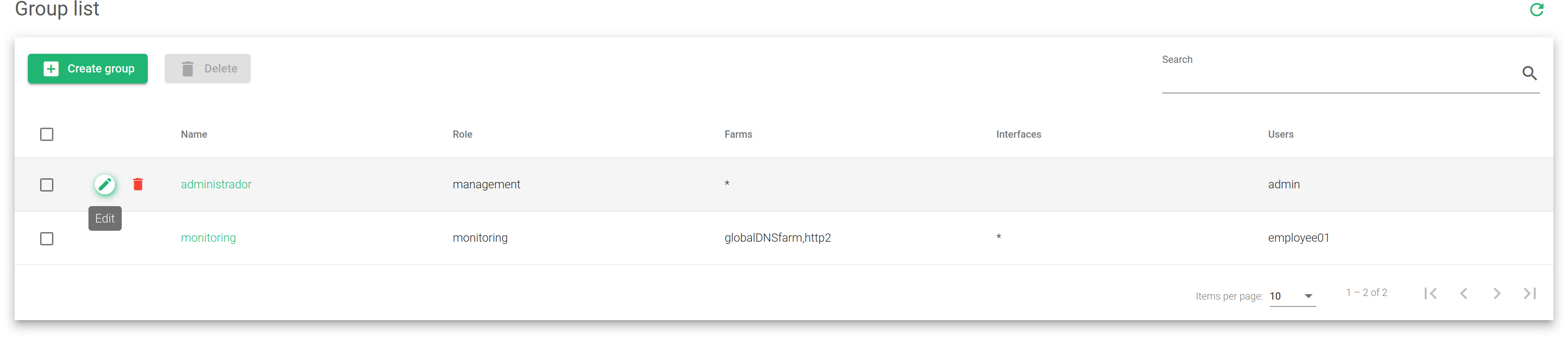
Name. A label that easily Identifies a group from the table.
Role. Role applied to the group. All users in the group inherit this role.
Farms. The farms allowed to be accessed by a group.
Interfaces. The interfaces allowed to be accessed by a group.
Users. A list of users in a group. The names of the users are their unique identifiers.
Actions. Use the following actions to manage the groups table.
- Create Group. Opens the group creation form.
- Edit. Used to change details in the group configuration form.
- Delete. Removes a group and its configurations from the system.
