
The RBAC User List allows you to manage system permissions on a user-by-user basis. Each user can have two types of permissions: ZAPI permissions and Web GUI permissions.
If a user has ZAPI permissions and has defined a ZAPI key, they can access the Load Balancer as a member of a Group through the API. Similarly, if a user has Web GUI Permissions or access to both, they can access the Load Balancer using their username and password.
The image below shows a list of users with their properties.
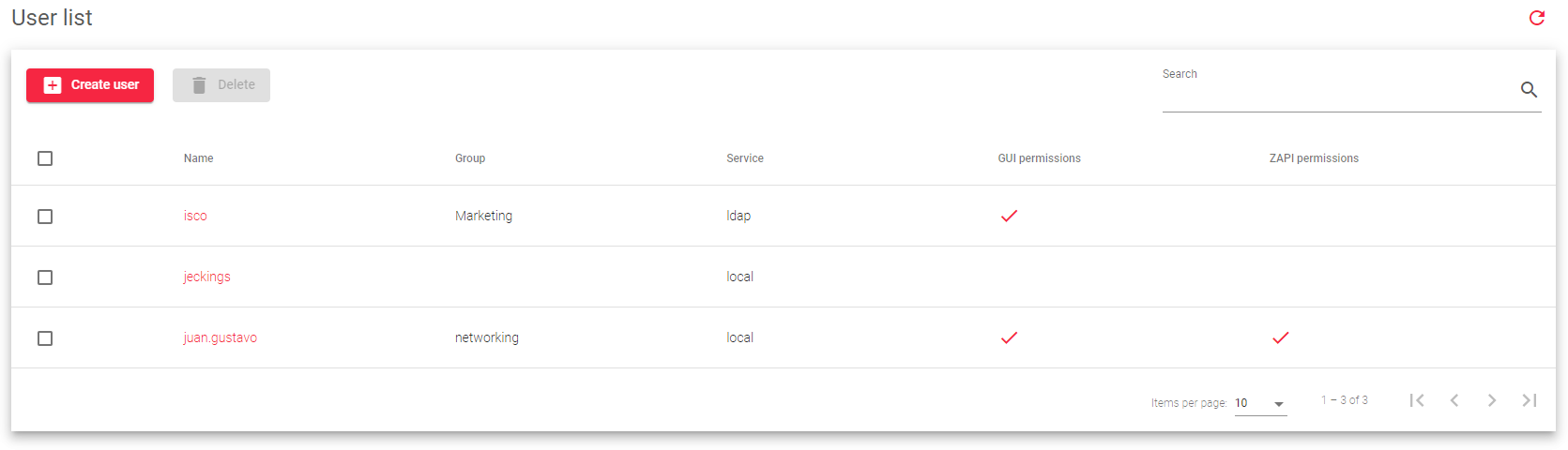
This is a brief description of each property:
Name: The username which is also used to log in to the Web GUI.
Group: The group that the user belongs to. A user can only belong to one group.
Service: Whether the user will authenticate to the system locally or through a Lightweight Access Protocol (LDAP) server.
GUI Permissions: Whether the user has permission to log in to the Web GUI.
- Red: The user is granted access to the SKUDONET Web GUI.
ZAPI Permissions: Whether the user has permission to access the Load Balancer through the SKUDONET API.
- Red: The user is granted access to use the SKUDONET API.
Actions: Actions that can be performed on the user list:
- Create User: Opens the form for creating a new user.
- Edit: Opens the form for editing a user’s configuration.
- Delete: Removes a user from the system.
Next Article: System | RBAC | Users | Create
