
To generate a Certificate Signing Request (CSR):
-
- Go to the LSLB > SSL Certificates section
- Click the Generate CSR button.
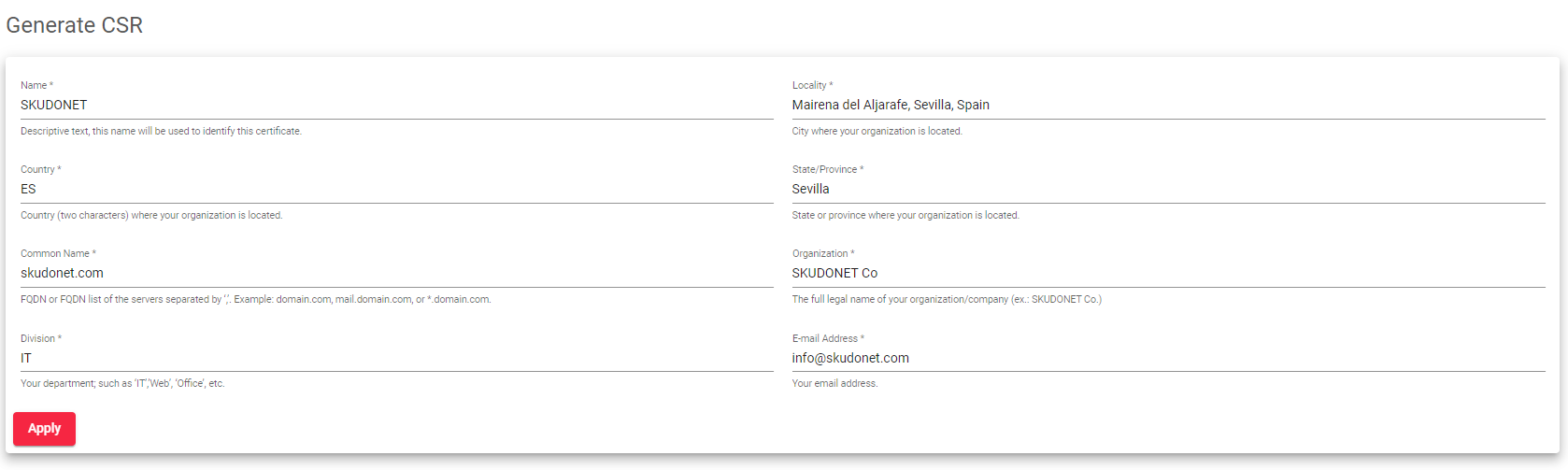
- Enter the following information in the form:
-
- Name: A name for the certificate.
- Locality: The city where your organization is located.
- Country: The country where your organization is located, using the Alpha-2 code (e.g., ES, UK, RU).
- State/Province: The state where your organization is registered.
- Common Name: The Fully Qualified Domain Name (FQDN) of the server to be certified, such as domain.com, mail.domain.com, or *.domain.com.
- Organization: The full legal name of your organization or company, such as Google Inc.
- Division: Your department designation, such as “IT Department,” “Web,” or “Office.”
- Email Address: Your contact email address.
- Click the Apply button.
A CSR file will be created. You can then use this file to obtain a trusted certificate from a Certificate Authority (CA).
Next Article: LSLB | SSL Certificates | Generate PEM
