
A Moodle deployment that performs flawlessly with 20,000 users can easily collapse under the load of 100,000 users on exam day or when course registration opens. The issue isn’t Moodle itself. It’s that, in a single-server deployment, everything (the web application, user sessions, database, and uploaded files) runs on the same machine. Once that server runs out of CPU or memory, or simply goes offline for maintenance, there’s nowhere else for the workload to go.
The obvious answer is to add a load balancer. The correct answer, however, is more nuanced. A load balancer distributes incoming connections, but it doesn’t automatically turn Moodle into a highly available platform. Unless every server shares the same sessions, database, and file storage, all you’ve really done is spread the problem across multiple machines.
What Is Load Balancing in Moodle?
Load balancing in Moodle is the process of distributing user requests across multiple Moodle web servers through a single virtual IP address. The load balancer continuously checks the health of each node and sends traffic only to servers that are available, ensuring that a failed or overloaded server doesn’t interrupt access for students and teachers.
Why Moodle Needs Load Balancing
- Traffic spikes: Exams with a common start time, enrollment periods, and grade publication can generate sudden bursts of concurrent traffic.
- Zero-downtime maintenance: Updating or patching a server shouldn’t require taking the entire learning platform offline.
- Growing numbers of concurrent users: A single server can only handle a finite number of simultaneous connections.
- TLS encryption: Managing certificates and TLS decryption on every web server adds unnecessary overhead that can be centralized at the load balancer.
The Real Architecture Behind a Highly Available Moodle Deployment
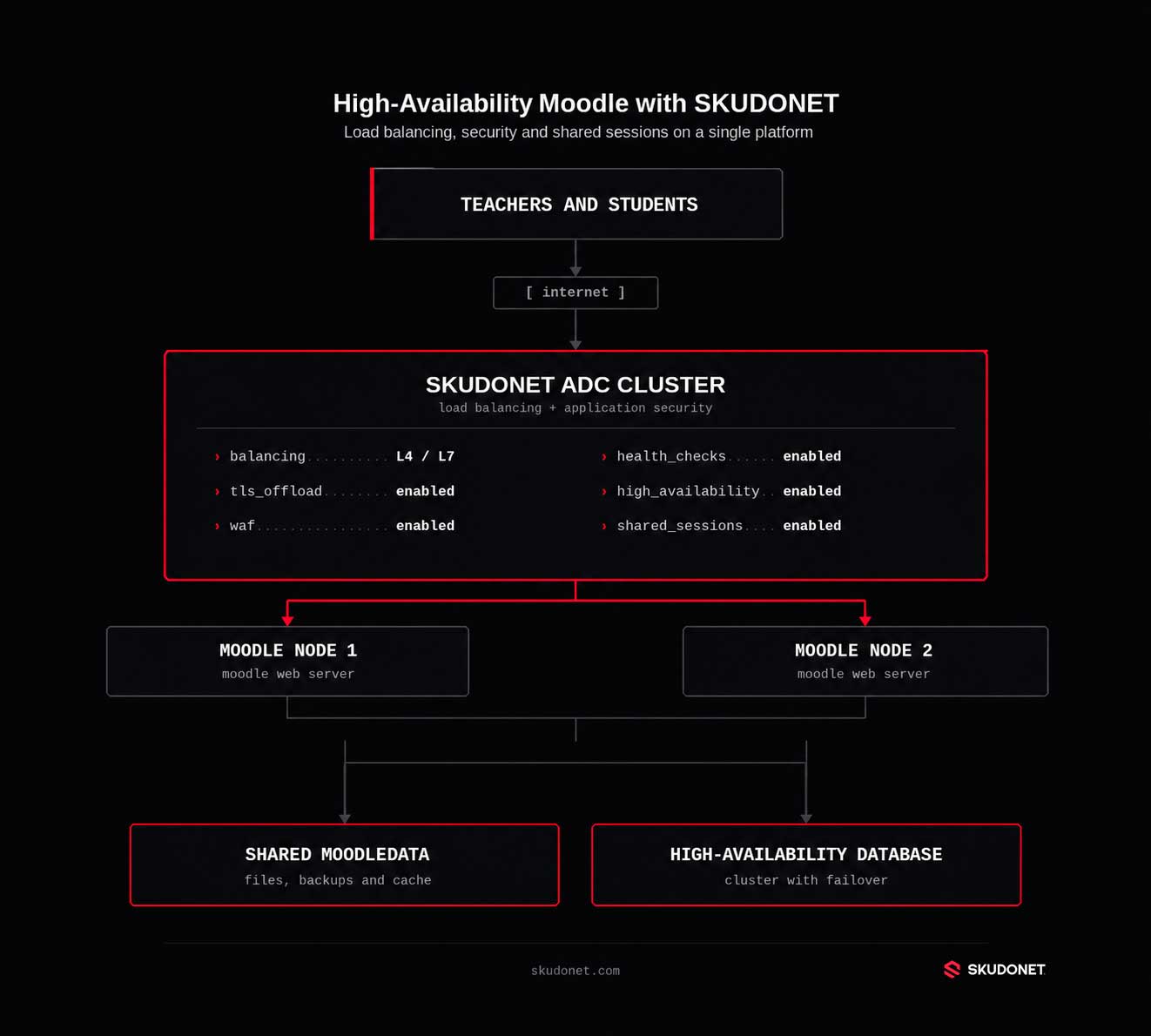
Moodle’s own documentation explicitly states that, in a multi-server deployment, all web servers must share the same cache, database, and file storage. If any of these components is missing, high availability exists only in theory.
The Load Balancer (ADC)
The Application Delivery Controller (ADC) accepts incoming connections through a virtual IP address, performs health checks on every Moodle node, and decides which server should handle each request. It is also the natural place to terminate TLS connections and enforce security policies before traffic reaches the Moodle application.
Multiple Moodle Web Servers
Every node must run the same Moodle version, include the same plugins, and use an identical configuration. If one server contains plugins or configuration that another does not, user experience becomes unpredictable depending on which node handles the request.
Shared Database
All Moodle web servers must connect to the same database, or to a clustered database infrastructure with failover capabilities. While the load balancer eliminates the single point of failure at the web layer, it does not remove the database as a potential single point of failure.
Shared moodledata
The moodledata directory stores uploaded files, backups, and generated content. It must reside on shared storage that is accessible from every web server. Otherwise, a file uploaded through one node won’t exist when the user’s next request is served by another node.
Shared Sessions and Cache
This is where many deployments fail.
Moodle supports Redis and Memcached as shared session stores across multiple nodes. Without shared sessions, users may appear to be logged out simply because their next request is handled by a different server. Redis Cluster also allows this layer to scale horizontally while providing its own built-in failover capabilities.
Why the Load Balancer Isn’t the Whole Solution
Removing the single point of failure from the web layer is only the first step. If the database, Redis, or moodledata still relies on a single server, that server remains the weak link capable of bringing down the entire platform.
How to Implement Load Balancing in Moodle
- Prepare identical Moodle nodes using the same version, plugins, and configuration.
- Configure a shared database and shared moodledata storage.
- Create an HTTPS virtual service using the public IP address and port that users will access.
- Add the Moodle servers as backend nodes for the virtual service.
- Configure application-level health checks rather than relying solely on open-port checks.
- Choose the appropriate load-balancing algorithm:
- Round Robin for identical servers.
- Least Connections when request duration varies.
- Weighted when backend servers have different capacities.
- Enable session persistence (sticky sessions) to reduce contention in the shared session store and keep each user’s requests on the same node.
- Configure SSL offloading. When TLS is terminated at the load balancer, Moodle requires
$CFG->sslproxyIf the internal and external URLs differ,$CFG->reverseproxymust also be configured. Every node should use the same public URL in$CFG->wwwroot - Preserve the client’s real IP address using X-Forwarded-For, while maintaining a well-defined list of trusted proxies.
- Make the load balancer itself highly available by deploying it as a two-node cluster with a shared virtual IP and synchronized configuration. Otherwise, the load balancer simply becomes the new single point of failure.
What Load Balancing Alone Doesn’t Solve
Distributing traffic across multiple servers doesn’t protect those servers from attacks. Adding that protection separately also introduces costs that are often underestimated.
A production Moodle deployment requires more than load balancing alone:
- Centralized TLS certificate management.
- A Web Application Firewall (WAF) for HTTP and HTTPS traffic.
- Protection against OWASP Top 10 attack patterns.
- Bot and brute-force protection for the login page.
- Rate limiting for login requests and file uploads.
- DDoS mitigation.
- Centralized logging and traffic visibility across all nodes.
- High availability for the load balancer itself, preventing it from becoming the new single point of failure.
In practice, each of these capabilities typically means deploying, managing, and maintaining a separate tool, console, and operational workflow if they’re implemented independently.
Why an ADC with an Integrated WAF Changes the Equation
When you consider everything required to support the architecture above, building a highly available Moodle deployment with standalone tools means operating, at a minimum, a load balancer, a certificate management solution, a WAF, a rate-limiting service, and a centralized logging platform—each with its own learning curve, update cycle, and potential point of failure if left unattended.
SKUDONET delivers the same architecture as a single integrated platform:
- Load balancing and application-aware health checks for Moodle nodes, supporting the algorithms described above (Round Robin, Least Connections, and Weighted).
- Centralized SSL offloading, allowing certificates to be managed from a single location instead of on every web server.
- An integrated WAF that protects against the OWASP Top 10, bots, and brute-force attacks without requiring a separate security product.
- Built-in rate limiting that can be applied directly to login endpoints and file uploads, the most exposed components of any public Moodle deployment.
- Native high availability for the ADC itself through clustering, ensuring that the availability layer doesn’t become the weakest link.
- A single pane of glass for monitoring traffic, blocked threats, and node health, eliminating the need to correlate logs from multiple systems during an incident.
The advantage isn’t that SKUDONET performs load balancing better than HAProxy or NGINX—both are technically robust solutions that have been powering Moodle deployments for years. The difference is that, with SKUDONET, load balancing, security, and high availability for the load balancer itself are built into the same platform from day one.
For teams that don’t want to become infrastructure integrators in addition to Moodle administrators, that translates into significantly less operational overhead and a much smaller maintenance burden.
Comparing Moodle Load Balancing Approaches
| Solution | What It Provides | What Still Needs to Be Added |
|---|---|---|
| HAProxy or NGINX | Load balancing, basic health checks, and traffic distribution. | WAF, centralized certificate management, rate limiting, high availability for the load balancer itself, and unified observability. |
| Native Cloud Load Balancer | Fast deployment within a specific cloud provider. | Portability outside that cloud platform. Advanced security features are often sold as additional managed services. |
| SKUDONET Enterprise Edition | Load balancing, TLS, WAF, rate limiting, high availability for the ADC itself, and centralized visibility in a single platform. Deployable as a virtual appliance, hardware appliance, bare metal installation, or cloud instance. | The appliance still needs to be sized and deployed within the chosen infrastructure. |
| SkudoCloud | The same feature set—load balancing, TLS, WAF, high availability, and observability—delivered as a SaaS platform with instant provisioning and no installation required. | Less direct control over the underlying infrastructure, since it is a fully managed service. |
For organizations with the time, expertise, and resources to maintain every component separately, HAProxy and NGINX remain excellent technical foundations.
For teams that need Moodle’s availability and security to work without turning infrastructure into an ongoing integration project, SKUDONET delivers the same capabilities as a single platform: Enterprise Edition for organizations that prefer full control over where and how the solution is deployed, or SkudoCloud for those who would rather not deploy any infrastructure at all.
SKUDONET Deployment Options for Moodle
- Virtual Appliance: Deploy on VMware, Hyper-V, Proxmox, KVM, or any other supported hypervisor.
- Hardware Appliance: Designed for universities, public-sector organizations, and training centers that require dedicated physical infrastructure.
- Bare Metal: Install the ADC directly on existing hardware.
- Cloud Instance: Ideal for Moodle deployments running in public cloud or hybrid environments.
- SkudoCloud: SKUDONET’s SaaS platform. Instant provisioning with no installation or long-term commitment required, including Layer 4/Layer 7 load balancing, an integrated WAF, and automatic TLS certificate management from day one. It’s the fastest way to place a highly available, secure application delivery layer in front of an existing Moodle deployment without deploying or maintaining your own appliance.
Load balancing Moodle isn’t simply about distributing traffic, it’s about designing the entire architecture for resilience.
User sessions, the database, shared storage, and security all need to be addressed together. Otherwise, the availability gained at the web layer can easily be lost elsewhere in the stack.
Building that architecture with separate tools is entirely possible, but it also means operating and maintaining multiple independent components.
An ADC with an integrated WAF doesn’t eliminate those architectural decisions, but it does consolidate them into a single platform that needs to be managed instead of five different ones.
Frequently Asked Questions
What Is Load Balancing in Moodle?
Load balancing distributes user requests across multiple Moodle web servers. It prevents a single server from becoming overloaded, eliminates the web layer as a single point of failure, and allows maintenance to be performed without disrupting access to courses, exams, or learning resources.
Does Moodle Support Load Balancing Natively?
Yes. Moodle supports deployments with multiple load-balanced web servers connected to a shared database, shared storage, and shared session store. Moodle’s official documentation describes architectures that include multiple web servers, clustered databases, and shared file storage.
What Are the Best Load Balancing Solutions for Moodle?
The answer depends on how much of the infrastructure your team wants to manage.
HAProxy and NGINX provide reliable traffic distribution but leave WAF protection, certificate management, and high availability for the load balancer itself to be implemented separately.
SKUDONET integrates all three capabilities into a single platform, available as Enterprise Edition for organizations that prefer to deploy it within their own infrastructure, or as SkudoCloud for those looking for an instantly provisioned SaaS solution.
Which Companies Offer Scalable Moodle Hosting with Built-In Load Balancing?
It’s important to distinguish between two different types of providers.
Some vendors manage the entire Moodle environment, including application hosting. Others—such as SKUDONET—do not host Moodle itself, but instead provide the load balancing, availability, and security layer that sits in front of an existing Moodle deployment, whether it’s running on-premises, in the cloud, or in a hybrid environment.
Where Can I Find Managed Load Balancing Services for Moodle Hosting?
SkudoCloud, SKUDONET’s SaaS platform, provides application load balancing and security with instant provisioning for existing Moodle deployments.
It doesn’t replace your Moodle hosting provider. Instead, it sits in front of your infrastructure, managing high availability, TLS termination, and WAF protection without requiring your team to deploy or operate that layer themselves.
When Should an Organization Load Balance Moodle?
Organizations should consider load balancing Moodle whenever the platform supports mission-critical education or training services, experiences significant traffic spikes, requires maintenance without downtime, or has reached the point where relying on a single web server represents an unacceptable availability risk.
