
Some backends don’t accept connections from just anyone: an SMTP relay that only trusts one address, an application server behind an IP allow list and a hardened legacy service that nobody wants to touch. Put a load balancer in front of them and that rule becomes a problem, because the address the backend sees now depends on how the balancer connects to it.
Source NAT, or SNAT, is how you take control of that address. The new SKUDONET Enterprise Edition 10.4.0, released in October 2026, adds it as a per-backend setting, available on every farm profile. This article covers how it works, how to configure it and when it’s better to leave it off.
What is Source NAT (SNAT)?
Source NAT (Source Network Address Translation) rewrites the source IP address of a packet as it passes through a network device. On a load balancer, it lets you open connections to a backend from an IP address you choose, instead of the one the connection would use by default.
The problem: backends that filter by source IP
Filtering by source address is common, and often for good reasons. SMTP servers limit who can relay through them. Application servers accept requests only from a known address. The rule is simple: traffic from IP X gets in, everything else doesn’t.
With a balancer in the path, that rule needs an answer. Either the backend allows list changes, or the balancer presents an address the backend already trusts. When the backend can’t be touched, only the second option remains.
The problem gets sharper when one balancer serves many farms and only some of their backends have this restriction. A global setting is too blunt: you’d change the behaviour of traffic that never needed it.
We built SNAT after a real request. A customer migrating from NetScaler needed certain backends to see the balancer’s traffic coming from one specific, accepted IP, with everything else left as it was. That need is what led us to develop it, and it’s now part of the product.
How SNAT works in SKUDONET Enterprise Edition
We implemented SNAT with netfilter’s nat layer, and you control it from the backend itself, inside the farm. This is how you set it up in SKUDONET Enterprise Edition:
- Open the farm and the service that contains the backend, and go to its list of backends.
- Click the edit icon of the backend that needs SNAT.
- In the SNAT field, open the dropdown. Each option shows an IP address and its network interface, and you can filter the list with the search box. Disabled is the default.
- Select the IP you want the backend to see as the source of the connections.
- Click Apply.
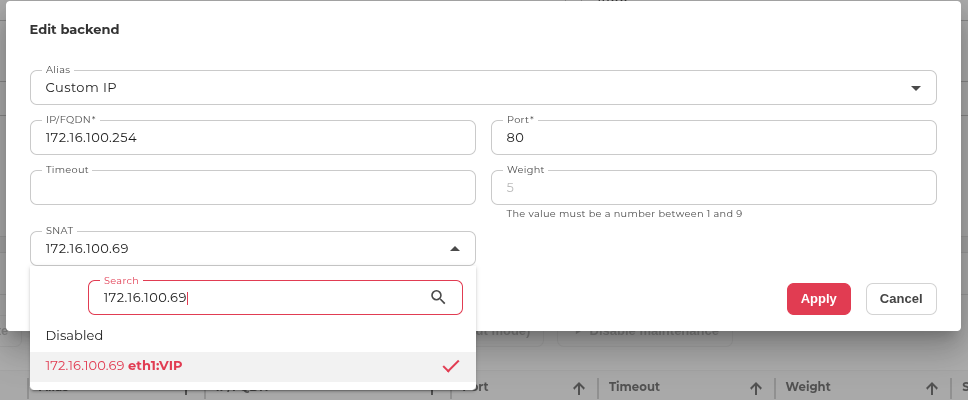
From then on, that backend’s connections leave the balancer with the selected source IP. It also helps keep return traffic on the right path: the backend’s replies go back through the load balancer. Besides that, the backend list gets a SNAT column, so you can audit which backends use SNAT, and with which IP, at a glance.
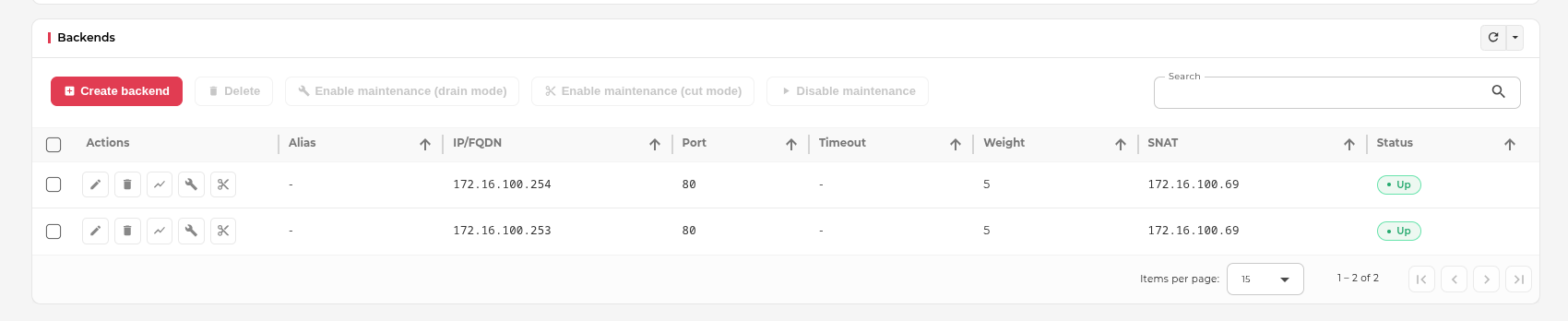
The same setting is available through the API, so you can include it in your existing automation. One limit to know about: each backend takes a single SNAT IP for now, not a pool. The FAQ explains when that matters.
Granularity: farm, service, backend
The useful part is how precisely you can apply it. The decision is made for a specific backend of a specific service in a specific farm, not for the whole appliance.
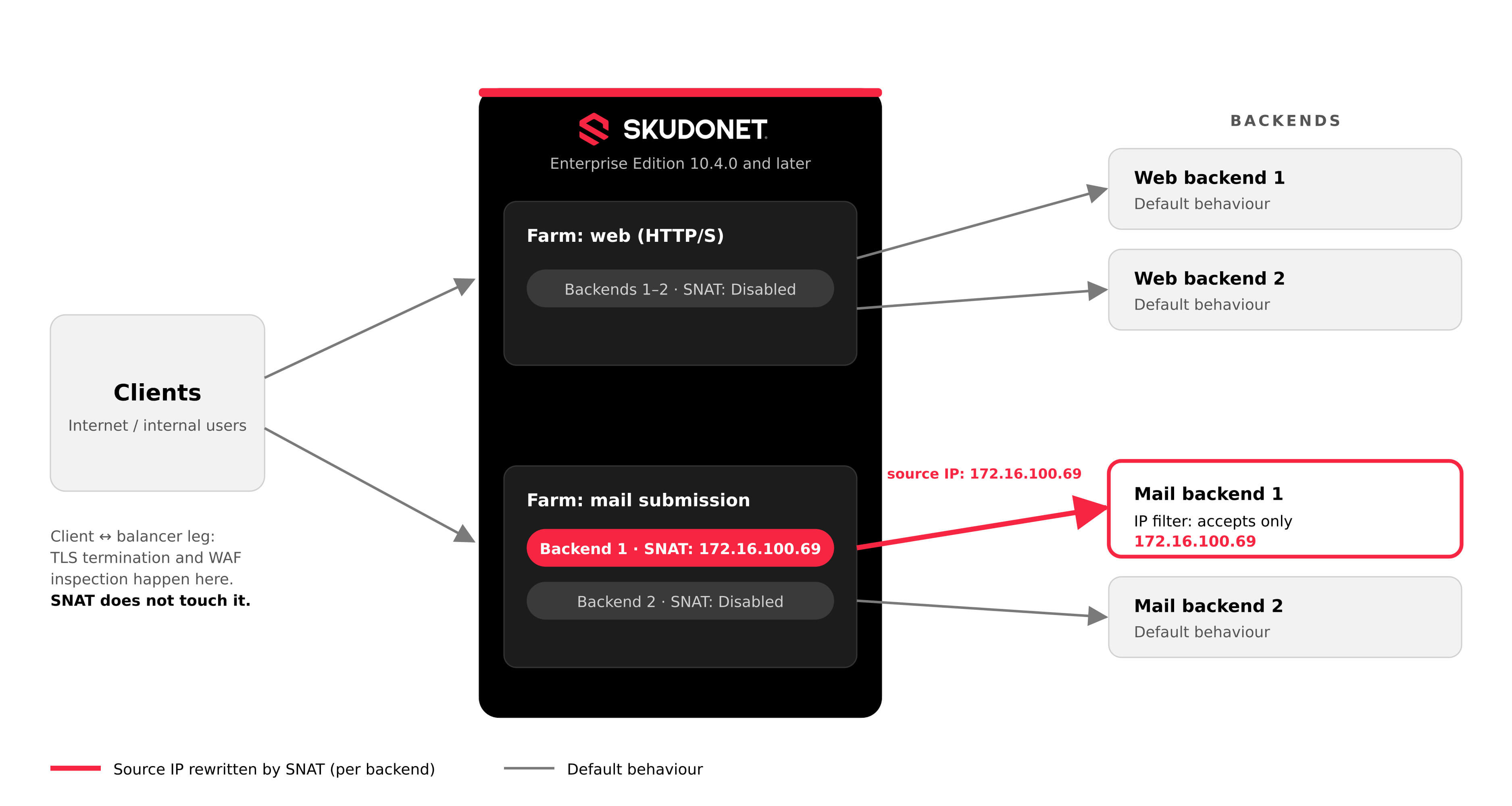
Imagine a cluster balancing a public web farm and a mail submission farm. Only one of the mail backends restricts connections to a single address, say 172.16.100.69. You set that IP as SNAT on that backend and leave everything else untouched. The web farm keeps its normal behaviour, and so do the other backends in the mail farm that don’t need the exception.
What SNAT does not change
SNAT acts on the leg between the balancer and the backend. Anything that happens between the client and the balancer stays as it was. That includes TLS termination, as described in our SSL offloading guide, and the inspection done by the WAF, which we cover in What Is Application Security?.
At TCP level, the backend sees the connection coming from the SNAT address. That is what makes the filtering work, and it is also how you spot it in a packet capture. On HTTP farms, the X-Forwarded-For header is not modified. If the next hop is another proxy, though, that proxy will add the SNAT address to the header, so expect to see it there.
Health checks and Farm Guardian
If a backend only accepts connections from one address, a health check coming from any other IP would fail, and the balancer could mark a healthy server as down. SNAT is integrated with Farm Guardian to avoid that. When the service of a farm has a Farm Guardian, the health check uses the SNAT IP and simulates the same communication the balancer makes. It verifies that the backend is alive and answers requests from that address.
When to use it, and when not to
Use it when a backend needs to see a specific source IP and you can’t, or don’t want to, change the backend. IP-filtered SMTP servers and application servers are the typical cases.
Don’t use it by default. Our team’s recommendation is to avoid configuring SNAT on every backend of every farm. Each exception is one more thing to remember when troubleshooting: the address you see in the backend’s logs no longer matches what you’d expect from the rest of the platform. Enable it where it’s needed and nowhere else.
Try it on your own backends
The quickest way to judge SNAT is to test it against the backend that causes you the most trouble. Download the SKUDONET Enterprise Edition evaluation and set it up on one backend of a test farm.
FAQ
What is the difference between SNAT and DNAT?
SNAT rewrites the source address of a packet; DNAT rewrites the destination. A load balancer uses DNAT-style translation to send traffic to a backend, and SNAT to change who that traffic appears to come from.
Is there a limit on concurrent connections with a single SNAT IP?
Each connection from one source IP to a given backend address and port needs its own source port, and that range is finite. With very high volumes of concurrent connections to one backend, a single SNAT IP can eventually run out of ports. A pool of SNAT IPs would spread that load, but it is not part of this release.
What happens to SNAT in a cluster failover?
The configuration made on the master node is replicated to the backup, and connections are preserved on failover.
