
In Role-Based Access Control (RBAC), groups are collections of users who share the same permissions. Groups can be used to simplify resource access and management. For example, a group could be created for all users who need access to a specific farm or virtual interface.
Each RBAC group has a unique name and description. Groups can have zero, one, or more users, farms, and virtual interfaces assigned to them.
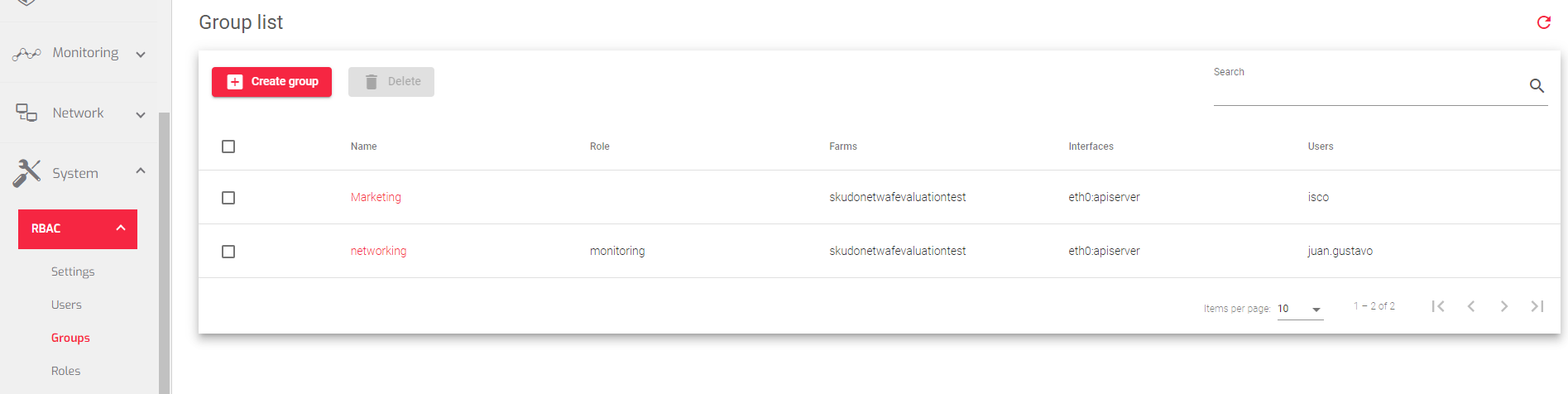
The image below shows a list of RBAC groups and their properties.
Description for each property
Name: A unique identifier for the group.
Role: The role that is applied to the group. All users in the group inherit this role.
Farms: A list of farms that the group is allowed to access.
Interfaces: A list of interfaces that the group is allowed to access.
Users: A list of users who belong to the group.
Actions: Actions that can be performed on the Groups table:
- Create Group: Creates a new RBAC group.
- Edit: Changes the properties of an existing RBAC group.
- Delete: Removes an existing RBAC group and all of its configurations.
Next Article: System | RBAC | Groups | Create
