
An application can pass every code review, every scan and a full penetration test, and still be exposed a month after release. A dependency gets a new CVE. A configuration drifts. Someone finds a request pattern nobody thought to test. Meanwhile the application is live, handling real traffic and real customer data.
That gap between “tested” and “safe” is what application security is about. This guide covers what the discipline includes, the threats that come up most often, how testing and runtime controls split the work, and where infrastructure like a web application firewall (WAF) or an application delivery controller (ADC) fits in.
What is application security?
Application security (AppSec) is the set of practices and tools used to keep software free of exploitable weaknesses and to protect it from attack throughout its life: design, development, testing, deployment and daily operation. Its goal is to protect the confidentiality, integrity and availability of the application and the data it handles.
In practice that means four jobs: building software that avoids known flaws, testing it to find the ones that slip through, controlling who can do what inside it, and monitoring and defending it once it is live. Different teams usually own different jobs, so gaps tend to appear at the handoffs between them.
Web application security is the same discipline applied to anything exposed over HTTP: websites, web apps and APIs. Most of the threats below belong to that group.
The threats that come up again and again
The OWASP Top 10 is the usual starting point for what to worry about. Instead of walking through all ten, it’s more useful to take five recurring threats and ask two practical questions: where does the real fix live, and what can help while that fix is still in progress?
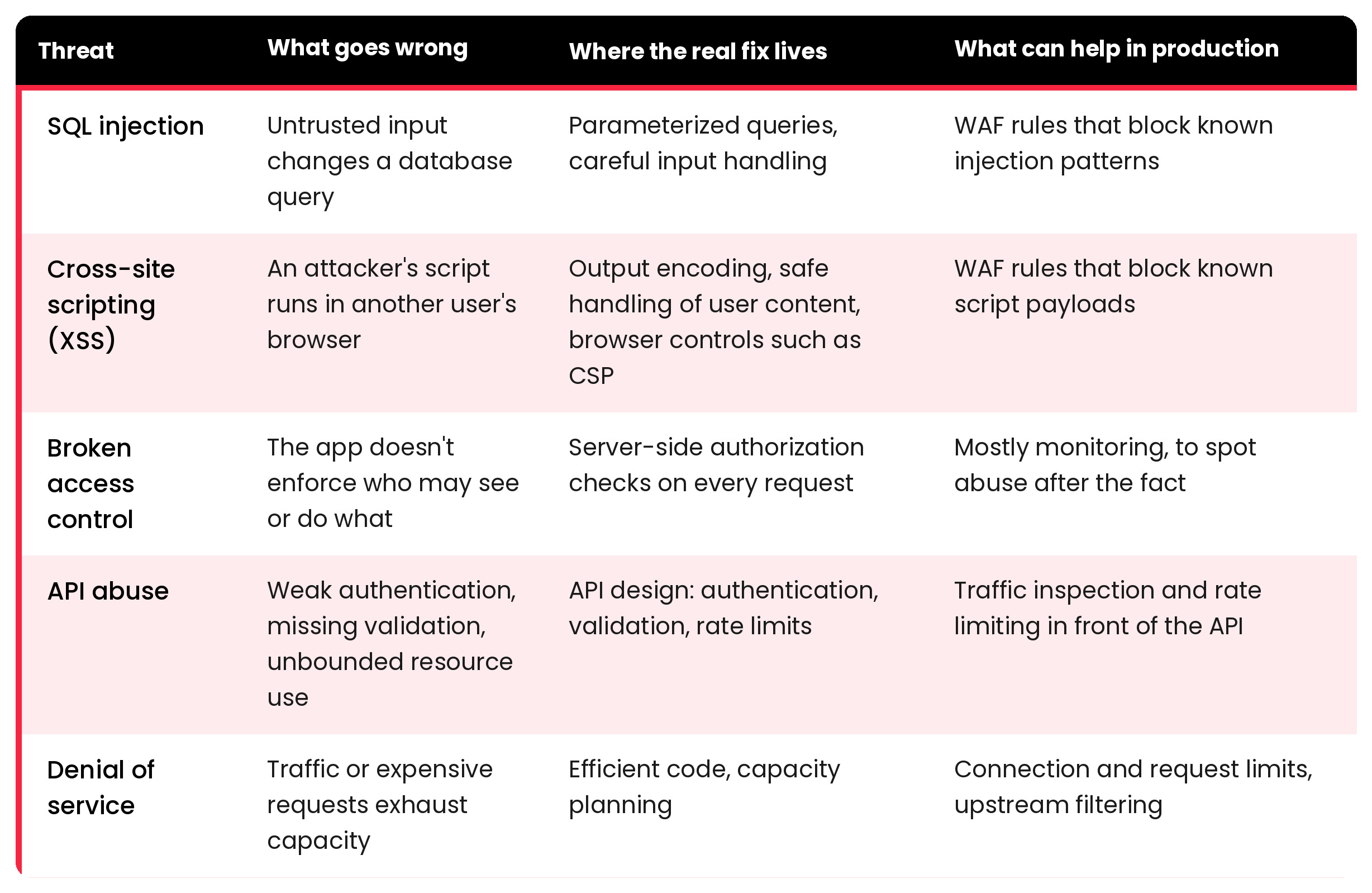
Broken access control deserves a note of its own. It has sat at or near the top of the OWASP Top 10 for years, and it’s the threat a perimeter device can do the least about. A request that reads another customer’s record usually looks perfectly normal. Only the application knows whether that user should see that record.
For APIs, rate limiting and schema validation, which rejects requests that don’t match the expected structure, are the controls most often placed in front of the application; see API Protection.
Denial of service is the odd one out because it isn’t about stealing anything. A SYN flood tries to exhaust the resources used to open TCP connections. An HTTP flood sends large volumes of requests that look legitimate, wearing down the application itself. Both attack availability, which is as much a part of security as confidentiality.
Securing the application before it ships
Most vulnerabilities are cheaper to fix before release, so testing comes first. Four techniques cover most of the ground:
- SAST analyzes source code without running it.
- DAST probes the running application from the outside.
- SCA inventories third-party components and flags known vulnerabilities in them.
- Penetration testing has people look for attack paths that automated tools miss.
Each one sees something the others don’t. SAST reads code but can’t observe runtime behavior. DAST observes runtime behavior, but only on what it can reach. SCA catches known problems in other people’s code, not logic flaws in yours. Threat modeling during design helps decide where to look in the first place.
They all share one limit: they describe the application on the day it was tested.
Why protection has to continue in production
After release, three things change. New vulnerabilities are disclosed in components you already shipped. Configuration and infrastructure change underneath the application. And the application meets traffic nobody planned for, hostile or not.
Fixing the code takes time. A patch has to be written, reviewed, tested and deployed, and the flaw stays exposed until then. That window is where runtime controls earn their place. They don’t remove the vulnerability. They reduce exposure while the fix moves through the pipeline.
Filtering malicious requests with a WAF
A web application firewall (WAF) inspects HTTP requests against a set of rules and blocks the ones that look like attacks. Placed in front of the application, typically at the reverse proxy or ADC, it can stop a recognizable SQL injection or XSS payload before it reaches the backend, with no change to application code. Security teams often call this virtual patching.
SKUDONET’s WAF is built on ModSecurity and the OWASP Core Rule Set, and its rules can be viewed, overridden and tuned. A textbook payload like admin’ OR ‘1’=’1′–, or a <script> tag that redirects the browser, matches the corresponding rules and is blocked at the delivery layer. Requests that don’t match pass through to the backend.
Two caveats apply to any WAF. It scores requests against known attack patterns, so a novel or obfuscated payload can get through, and a strict rule set can block legitimate users. The OWASP Core Rule Set, for example, has paranoia levels that trade stricter detection for more false positives, which is why new rules are usually tested in detection mode and tuned before they start blocking.
Signatures aren’t the only lever. You can also shrink the audience: restrict access by source IP, geography or HTTP headers, and filter known-bad sources with reputation lists (see Web Security). And because blocked requests are evidence, log them: WAF logs typically show the rule that fired, the matched variable and a transaction ID, which turns a block into something the team can investigate.
We cover the delivery-layer side of this in more depth in Security in Application Delivery, and the WAF page describes the capability itself.
Limiting floods
For denial of service, the first line of defense is simple: don’t let any single client consume more than its share. SYN and UDP floods can often be dropped at layer 4, before they reach application logic, and HTTP floods are usually handled at layer 7 with rate limiting, anomaly detection and bot filtering. SKUDONET’s DoS layer, for example, can cap connections per source IP and protect against RST floods.
The limits of this approach are worth stating plainly. Per-IP caps work well against floods from a small number of sources. A large distributed attack spreads across thousands of addresses, and any attack bigger than your available bandwidth saturates the link before the traffic ever reaches your ADC. Those cases need filtering upstream, from your ISP or a scrubbing service, with on-premises controls handling what’s left. See DDoS Protection.
Keeping the application available
To users, an attack and an outage look the same: the application is slow or gone. An ADC distributes requests across several backend servers, uses health checks to stop sending traffic to servers that fail, and can run as an active-passive pair in which a standby node takes over if the primary fails. SKUDONET supports all three.
In SKUDONET’s active-passive clusters, WAF and IPDS configurations are automatically replicated to the standby node, along with active connections and sessions. This allows the secondary node to take over while maintaining the same security policies and preserving connection and session state.
High availability reduces the risk of service disruption, although failover behavior and overall availability still depend on the broader infrastructure and application architecture.
Seeing encrypted traffic
A WAF can only inspect what it can read. If TLS is terminated at the ADC or reverse proxy, the WAF sees the decrypted request, and the ADC can re-encrypt the traffic before forwarding it to the backend. If encrypted traffic passes straight through, nothing gets inspected. Terminating TLS there also brings certificate management and the question of how the hop to the backend is protected. TLS/SSL Inspection covers how SKUDONET handles it.
Application security vs. network security
Network security controls who and what can reach your systems: firewalls, segmentation, VPNs, intrusion prevention. Application security deals with what the application does with the requests it accepts.
A network firewall will happily allow port 443 traffic to a vulnerable web app. Judging the content of the request is up to the application, or a WAF in front of it. You need both, and neither substitutes for the other.
Application security best practices to start with
These apply to most organizations. The order depends on your risks and on what you already have in place:
- Enforce authorization on the server for every request, and test it explicitly.
- Know what you run. Keep an inventory of dependencies and track their disclosed vulnerabilities.
- Put testing in the pipeline at a cadence that fits each technique and the risk.
- Protect internet-facing apps with a WAF. Start in detection mode, tune, then block.
- Keep TLS configuration and certificates current.
- Log what matters (blocked requests, authentication failures) and make sure someone reads it.
- Plan for availability: rate limits, health checks, redundancy and an upstream option for large DDoS attacks.
One question to keep asking
Application security doesn’t end at release, but it doesn’t move entirely to a firewall either. Code decides most of what’s exploitable. Runtime controls decide how long a mistake stays exploitable.
For any application you run, the useful test is this: if a flaw were disclosed tomorrow, how fast could you fix it, and what would stand in front of it until you did? If you’re looking at WAF or DDoS controls at the delivery layer, the WAF and DDoS Protection pages show how SKUDONET approaches them.
Frequently asked questions
What is the difference between application security and web application security? Application security covers software of any kind. Web application security focuses on applications and APIs exposed over HTTP, where threats like SQL injection and XSS are most common.
Can a WAF stop all application attacks? No. A WAF blocks requests that match known attack patterns. It can’t fix a vulnerability, enforce correct authorization, or reliably catch every new or obfuscated payload. It reduces exposure while the code is fixed.
What does an ADC add to application security? An ADC sits in front of the application and controls how traffic reaches it. It can distribute load, detect failed servers, support failover and host controls such as a WAF or connection limits. It complements secure code and testing and doesn’t replace them.
